Announcing pear-mobile and pear-runtime-react-native, peer-to-peer over-the-air updates for React Native applications on iOS and Android – with the hello-pear-react-native boilerplate to start from.
Same deployment flow for Desktop, Terminal and Mobile
In Pear Evolution we said an equivalent of pear-runtime for iOS and Android was in the works, named pear-mobile. In Hello Pear Boilerplates we said a React Native boilerplate was coming. Both are here.
The deployment flow for mobile OTA updates is the same as for desktop and terminal applications: pear touch, pear stage, pear provision, pear multisig and pear seed operate on a Deployment Directory created with pear build.
On mobile the directory holds a Metro bundle file per host:
dist/
  package.json
  pear.json
  by-arch/
    ios-arm64/app/HelloPear/app.bundle
    ios-arm64-simulator/app/HelloPear/app.bundle
    ios-x64-simulator/app/HelloPear/app.bundle
    android-arm64/app/HelloPear/app.bundle
These builds are synchronized to Hyperdrives with the pear stage, pear provision and pear multisig commands which supply the equivalent of staging, prereleease and production environments. The deployment documentation details everything you need to know but it’s noteworthy that pear multisig can now be used to multisig releases of iOS and Android application updates.
Multisig does two jobs. It binds a production release to collective signoff instead of to whoever ran the command and it unbinds the drive from the machine: multisig’d drives are the only Pear application drives that are not machine-bound. All production applications should be multisig’d.
There are three distinctions between deploying desktop & terminal applications versus deploying mobile updates:
- For mobile updates the Deployment Directory does not contain the full application, it contains a bundle of the React Native view code, assets and the Bare worklet local backend code.
- Native code, prebuilds and native configuration updates must be delivered via the usual App Store and Play Store, per the usual update flow for each OS.
- Pear Mobile comes with support for an
updates.minverfield on thepear.jsonfile which must go alongside thepackage.jsonin the Deployment Directory. This is necessary to declare the oldest native version an OTA update payload runs on, so devices on an older store build skip the update and are prompted to install from the store.
Inside a Pear Mobile React Native App
The hello-pear-react-native boilerplate provides the architectural outline for a React Native application with a local backend on Bare JS runtime with peer-to-peer over-the-air updates deployed using Pear CLI.
An application has two JavaScript runtimes: one for the view, one for the local backend. The interface is rendered with Hermes, the JavaScript runtime that comes with React Native. This is the view. A worklet runs Bare JavaScript Runtime alongside the view through react-native-bare-kit. This is the local backend. The local backend does the peer-to-peer work; application logic, updater logic, business logic all go here. The view and the local backend talk over an IPC pipe.
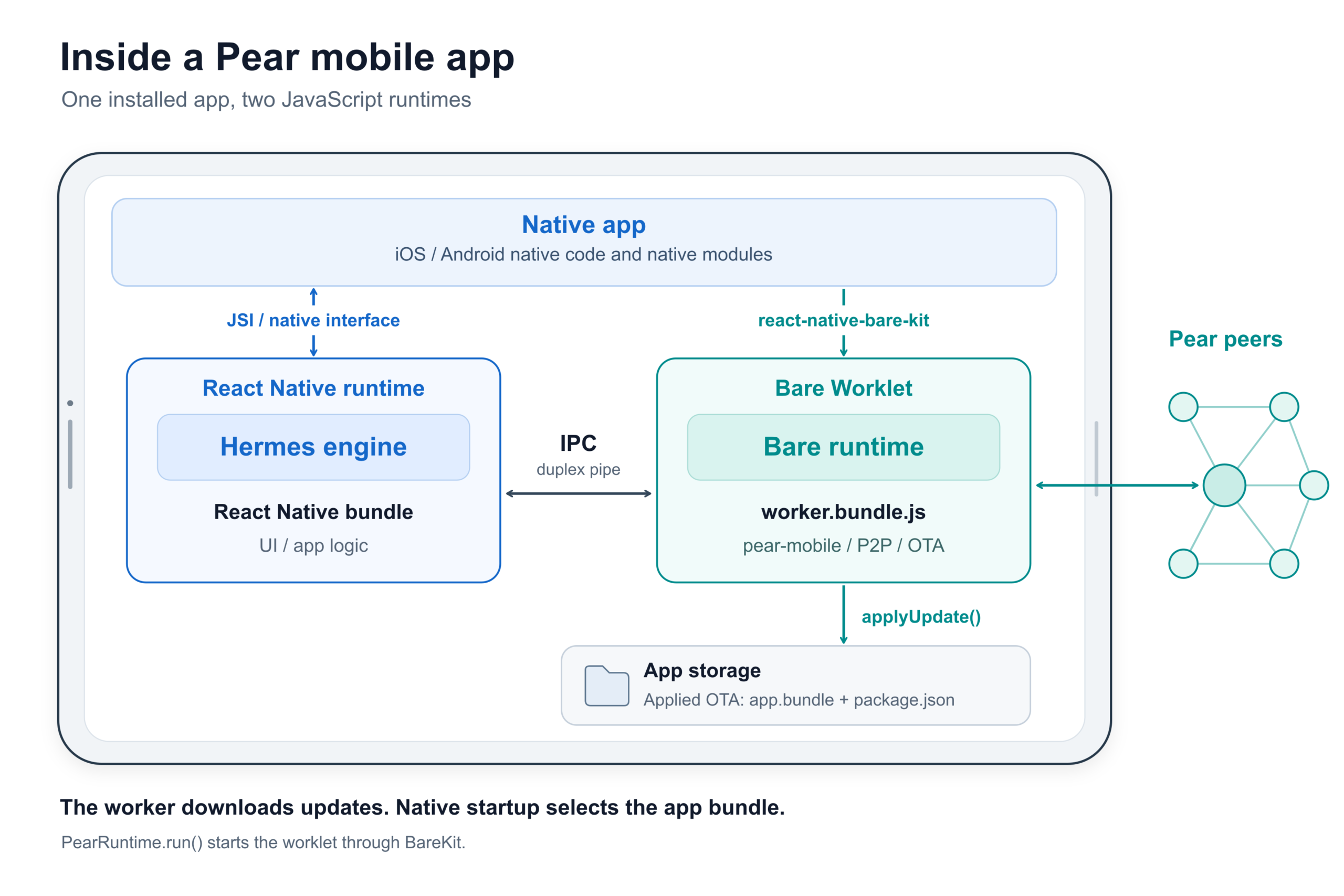
This is the equivalent worker architecture as used in hello-pear-electron desktop boilerplate. On mobile the Bare worklet is the local backend. The same local backend can be used for desktop, terminal and mobile applications – in all cases they’re running on Bare.
The pear-mobile library runs inside the worklet local backend providing updates, support for additional Bare workers and peer-to-peer storage management.
The pear-runtime-react-native Expo config plugin patches the generated Swift AppDelegate and Kotlin MainApplication at prebuild, so a release build can boot an applied OTA bundle. The worker downloads, native startup selects, and an end-to-end update needs both.
React Native starts the worker and holds the pipe:
import Pear from 'pear-mobile'
import bundle from './worker.bundle.js'

const IPC = Pear.run('/worker.bundle', bundle, argv)
Important to note: the worker.bundle path here represents a Bare bundle whereas the deployed app.bundle is a Metro bundle file.
The worker listens and applies:
const Pear = require('pear-mobile')
const { version, upgrade, productName } = require('./package.json')

const pear = new Pear({ version, upgrade, name: productName })
pear.updater.on('updated', async () => {
  await pear.updater.applyUpdate()
})
The updating and updated events reach the interface over that pipe, so an application can show progress and wait for a button press before applying anything.
Unified version sequence
A mobile OTA update carries JavaScript in a metro bundle. A payload written against native code that a phone never received would break once it booted, so any release needing new native code must go through the store. Native and OTA releases therefore share one increasing SemVer sequence, and every payload declares the oldest native version it runs on.
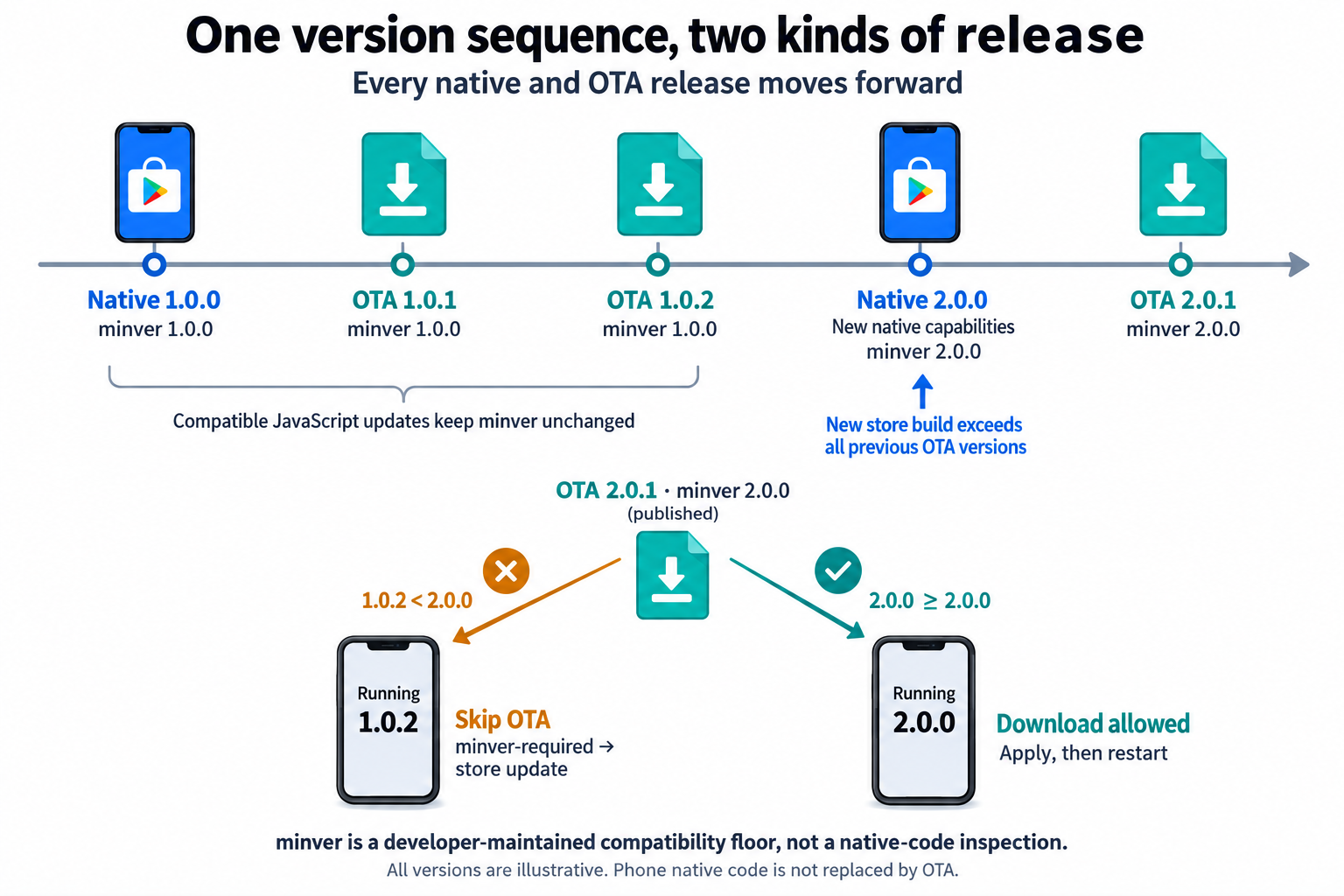
Every OTA update is newer than the native build it lands on and newer than every OTA before it.
Every store release is newer than every OTA published so far, or an old OTA keeps overriding the native bundle a user just installed.
The pear.json updates.minver field can be used to set a minimum native threshold before an application can recieve an OTA update requiring the specific minimum version. The minver field only needs to be altered when a change relies on new/altered native code or native dependencies (prebuilds) and should be set to the exact version of that native change release.
{
  "updates": {
    "minver": "0.0.0-0"
  }
}
The pear-mobile library reads pear.json off the drive:
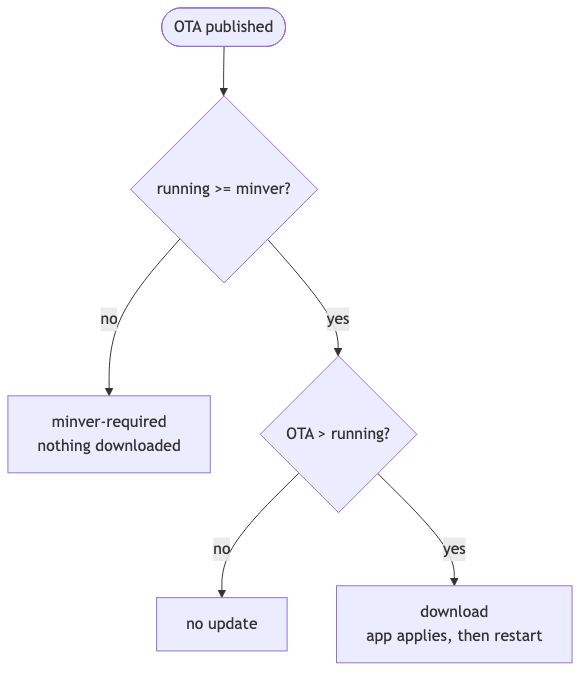
Below the version floor nothing downloads and minver-required event fires. Prompting the user to update from the store is the application’s job, nothing shows by default. The gate ships inside each payload’s own pear.json, so it applies from the moment that update is written to the application drive by pear multisig (or pear provision, or pear stage) and cannot be added to one already published.
The hello-pear-react-native boilerplate is set up so that the package.json version is the single source of truth for the application SemVer. Expo writes it into the native build at prebuild, and the build copies it into the OTA release payload. Every payload also declares the oldest native version it runs on.
Update-at-boot
Startup has two bundles available: the one from the store build and the one an OTA saved to app storage. Native code reads pear-runtime/ota/app.bundle and the package.json beside it, and takes the higher version.
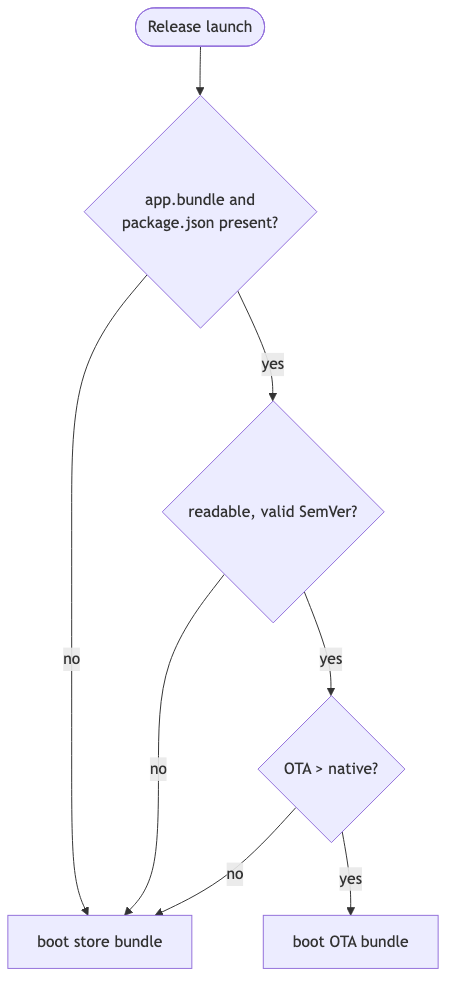
One bundle runs. An equal version leaves the store bundle in place, so a newer store release supersedes an older OTA. Missing files, an unreadable manifest or a version that is not valid SemVer all fall back to the store bundle. Debug builds load from Metro, so selection only happens in a release build – use npm run production:ios or npm run production:android to test an update.
The ordering of app store releases and P2P OTA updates matters. OTA versions climb above the installed native version — that is how they get selected. But each new store release must be numbered above every applied OTA before it – otherwise the OTA bundle wins the comparison at launch and the store build runs its new native code against old JavaScript, which may be incompatible and could require manual recovery.
Get started
Clone the boilerplate. It carries the worker, the native integration, the update interface and the build scripts.
git clone https://github.com/holepunchto/hello-pear-react-native
The Readme is a walkthrough from first dev run to production release.
Integrating into an existing React Native application
For an application that already exists:
npm install pear-mobile react-native-bare-kit pear-runtime-react-native
Register pear-runtime-react-native in Expo’s plugins, extend metro.config.js from the React Native and Expo defaults, and wire the worker’s update events into the interface. Declare react-native-bare-kit in the project root package.json – autolinking only reads the application’s own dependencies when it decides which native modules to compile, and a copy arriving through another package passes the JavaScript require then fails on the device.
Expo SDK 55 or newer, Android API 29 or newer. Plain React Native works with manual native integration.
Both modules are MVP and experimental. Interfaces will change.
Full setup and source:
Show us what you got
Terminal, desktop and mobile now deploy peer-to-peer through one flow. Join the Pear Development group on Keet and tell us what you’re thinking and what you’re working on: