
You open your password manager. Everything appears to be fine, but somewhere, probably in a data center, there is an encrypted copy of your entire data. One breach later, attackers have that copy too. They just need time. That’s the cloud model, and it has always been.
PearPass does the opposite. There is no copy of your data anywhere. Your data lives only on the devices you own. When they talk, they talk directly. There is no middleman.
If you have not read the first post yet, Introducing PearPass, start here. This one gets into what PearPass is and why we build it.
How cloud password managers actually work
Most password managers work in the same way. You create a vault, it gets encrypted on your device, and then it gets uploaded to the cloud. When you log in on a new device, it downloads that encrypted vault and unlocks it locally. Your master password never leaves your device, and in theory, even if someone gets the vault, they cannot read it.
Sounds safe, right ? But here is the problem.
To make it work, the password manager has to store your encrypted vault somewhere central. Which means there is always a copy of your data that is not on your device. And that copy is a target.
In 2022, one of the most widely used password managers had its entire vault database copied off its servers. Not decrypted, just taken. Attackers do not need to break encryption immediately. They can copy the data and just take it offline. And it wasn’t the first time something like this happened, and it won’t be the last.
That’s the problem, because every cloud password manager, no matter how good their cryptography is, has to store your vault somewhere. That somewhere is one breach away from being somewhere else entirely. Sure, breaking modern encryption takes time, but that’s the wrong bet to make.
So we removed the server entirely.
PearPass is built on Pear Runtime, a platform for peer-to-peer applications, and Bare, the lightweight JavaScript runtime that powers core parts of that stack.
In the Pear ecosystem, apps are not deployed to centralized servers. Instead, an app is deployed as a cryptographic append-only log. When an update is released, it is simply appended as a new entry. The devices running the app act as peers in a swarm, replicating this log organically. If your device needs the latest app update, it can pull it directly from another device on the network that already has it, completely bypassing a central download server.
Like Node.js, Bare provides an asynchronous architecture for writing JavaScript. Unlike Node.js, Bare makes embedding and cross-device support its core use cases.
While Node.js is powerful, it is massive and complex to securely embed inside apps. Bare solves this by providing a tiny runtime that gives developers fast and direct access to native low-level OS capabilities.
How devices find each other:
If there is no central server, how do your devices actually find each other?
That’s because of Hyperswarm, a peer-to-peer networking stack that handles discovery and bypasses network firewalls, allowing your devices to communicate directly. We went in-depth on exactly how that works in “P2P from Scratch — Part 1: The Internet is Hostile.
But finding each other is only the first step. The next part is to securely pair and share your passwords without a central database. When you want to link a new device, PearPass generates a temporary invite code.
Once your new device scans it, the two devices find each other via Hyperswarm. After trust is established, Autobase takes over. When you add a new password to your phone, Autobase simply appends it to your local log. The next time your laptop is online, the two devices connect directly, and Autobase seamlessly syncs the log, fetching only the new entries from your phone.
Hypercore: where your vault actually lives
So we have append-only logs replicated between peers, and Hyperswarm connecting devices directly. Now: how does PearPass actually store your passwords on top of all this?
Each vault is made up of many Hypercores – a single-writer append-only log. Add a password, that’s a new block. Update one, new block. Nothing is overwritten.
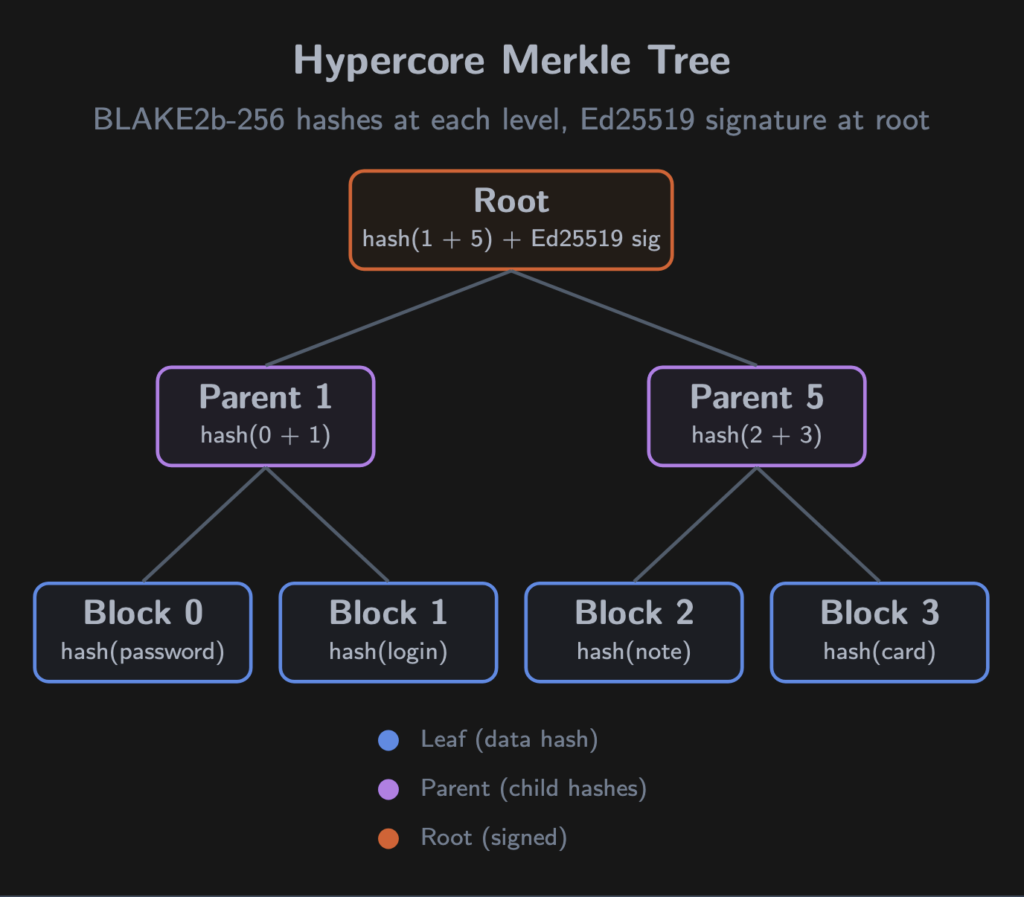
But a Hypercore isn’t just a dumb list. Every block is hashed with BLAKE2b-256 and placed into a Merkle tree. Parent nodes hash their children, all the way up to the roots which are signed with Ed25519 – and only your device holds the private key.
When another device downloads a block, it recomputes the hash path from leaf to root and checks the signature. One tampered bit anywhere, and verification fails. Even if data passes through an untrusted relay, integrity is mathematically guaranteed.
Key insight: Verifying one entry in a vault of a thousand passwords takes ~10 hash operations (log2(N)). Cheap enough for a phone.
Why this fits password syncing
For P2P, the append-only property is exactly what you want:
– Syncing is trivial. Your device has blocks 0-47. The other has 0-52. Download five blocks. Done.
– Offline-first by nature. Append locally, sync when connectivity returns.
– Built-in history. Accidentally overwrote a password? The previous version is still in the log.
– Sparse replication. A new phone can grab the latest state and backfill lazily.
Corestore: managing multiple logs
A vault needs more than one log – records, metadata, attachments. Corestore is the factory that manages this collection on your device.
PearPass creates Corestore instances at three paths:
– encryption/ – master password metadata (salt, nonce, ciphertext). Never leaves the device.
– vaults/ – directory of all your vaults and their encryption credentials.
– vault/{id}/ – actual records, files, and metadata for each vault.
Corestore derives deterministic keys from a single primary key using BLAKE2b – same vault name, same keys, every time. It handles session management, garbage collection, and on mobile, suspend/resume for backgrounding.
No cloud bucket. No S3. Your filesystem, and only yours.
Autopass and Autobase: multi-device sync
A single Hypercore is single-writer — one key, one log. Fine for one device. But a password manager needs writes from your laptop, phone, and tablet, possibly at the same time, possibly offline.
This is what Autobase solves. Autopass is the layer built on top of it that PearPass uses as its distributed password store.
Simultaneous writes
Each device gets its own Hypercore with its own signing key. Add a password on your phone while editing one on your laptop — both write to their own logs independently. No coordination needed.
The sync is where it gets interesting.
Autobase collects all the independent logs and builds a causal DAG (Directed Acyclic Graph). Every entry carries a vector clock referencing what the writer had seen from other devices at write time:
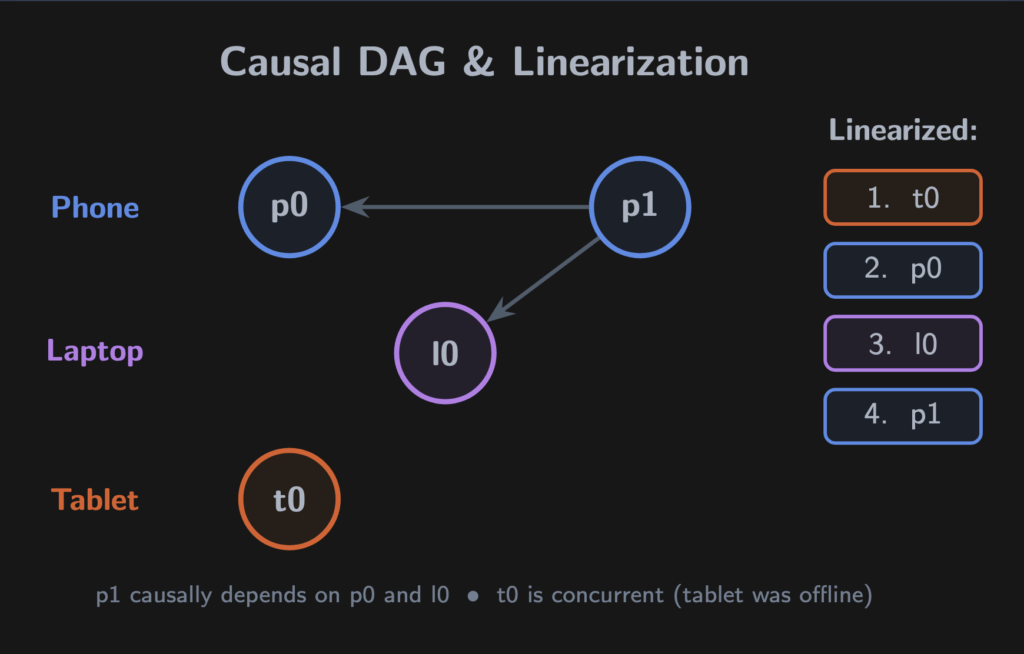
p1 depends on both p0 and l0 — the phone had seen the laptop’s write. t0 is concurrent with everything; the tablet was offline.
Autobase’s linearizer flattens this DAG into a single deterministic sequence. A node never precedes one it references (causal consistency), and concurrent branches are ordered by comparing writer public keys. Same algorithm, same DAG, same result — every device.
Terminology – linearization: Flattening a DAG of concurrent writes into a single ordered sequence all peers agree on. No leader election, no voting rounds. Just math.
When the order changes
The tablet comes online. It introduces new causal information. Some entries may need to move.
Autobase undoes the view back to the fork point and reapplies in the corrected order. The HyperDB B-tree that Autopass maintains rebuilds deterministically.
To prevent unbounded reordering, Autobase uses quorum checkpoints. Devices acting as indexers vote on the ordering. A majority agrees (quorum), that agreement is acknowledged by a majority (double quorum), and the ordering becomes permanent — the signedLength. Lagging devices fast-forward to this point without replaying history.
The pairing flow
We covered how Hyperswarm connects devices. Here’s what happens at the application layer when you pair a new device:
1. Your existing device creates an invite, a z32-encoded string with the vault’s discovery key and a seed. Displayed as a QR code or copyable text.
2. Your new device scans it and initiates pairing via the blind-pairing protocol, connecting without revealing the vault’s public key on the network.
3. Both devices prove they hold the invite. The existing device sends the bootstrap key and encryption key through the secure channel.
4. The new device initializes its own writer in the Autobase. Full read-write access.
5. The invite is consumed and revoked. Can’t be reused.
No server sees the invite, the keys, or the handshake.
Blind peers: availability without trust
The P2P dilemma: all your devices are asleep, your vault is unreachable.
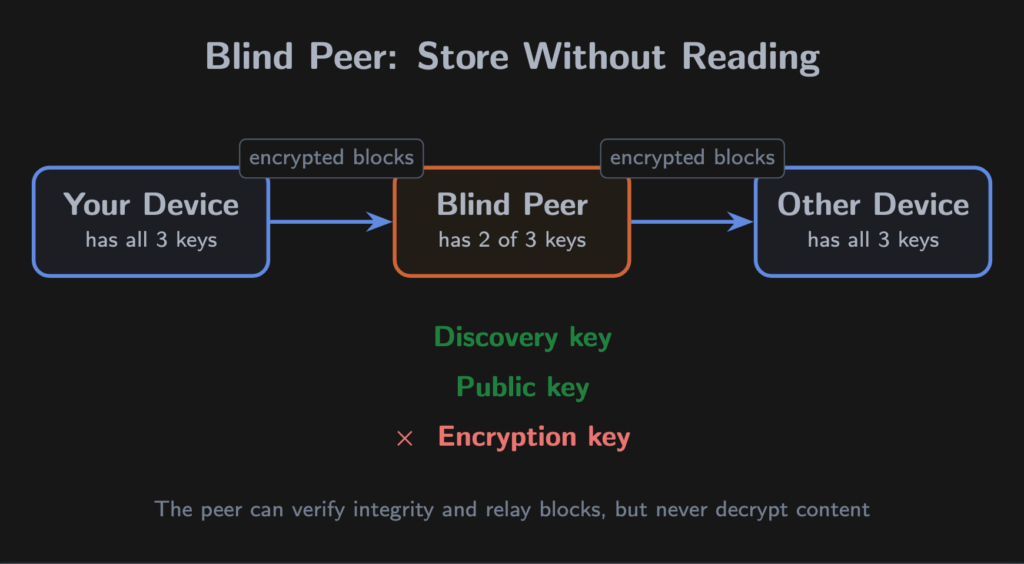
Blind peers solve this. A blind peer stores and replicates your data — but cannot read any of it. This works because of Hypercore’s layered key design:
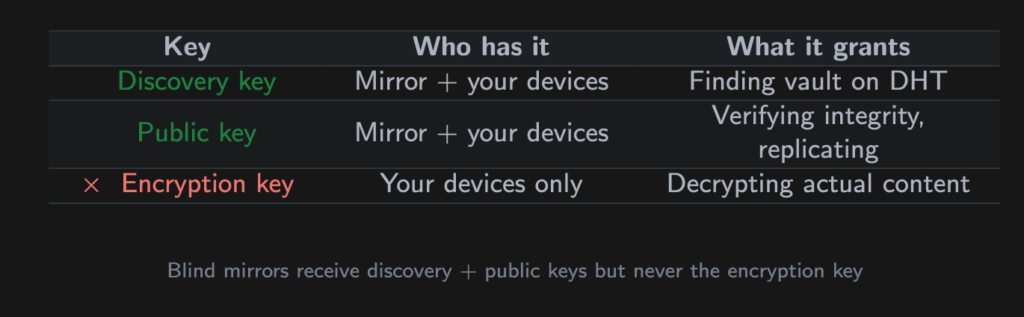
The Merkle tree hashes the encrypted ciphertext, not the plaintext. The peer stores opaque blobs. It can verify they haven’t been corrupted, but cannot see what’s inside.
PearPass ships with four default peers and supports up to five user-added ones. Run your own on a VPS, at a friend’s house, anywhere. Peers are validated via HyperDHT before being added — no response within 5 seconds, rejected.
The peer operator, even if it’s us, learns nothing about your passwords.
The encryption layer: what happens to your master password
The stack so far handles storage, multi-writer sync, and replication. Now: how does PearPass actually protect your data?
Password hashing: Argon2id
When you create or unlock a vault, your master password is hashed with Argon2id through sodium-native (libsodium’s native bindings). The parameters are deliberately aggressive:
– OPSLIMIT_SENSITIVE – the highest iteration count libsodium offers
– MEMLIMIT_INTERACTIVE – significant memory per attempt, defeating GPU parallelism
Generate a random 32-byte salt, feed it with your password into crypto_pwhash, get a 32-byte derived key.
The salt is stored with your vault metadata. The derived key exists in memory only — never on disk. After use, sodium_memzero() wipes every sensitive buffer byte-by-byte. Not garbage collection. Deliberate zeroing.
Two-layer key wrapping
Your vault isn’t encrypted directly with the hashed password. PearPass uses two layers:
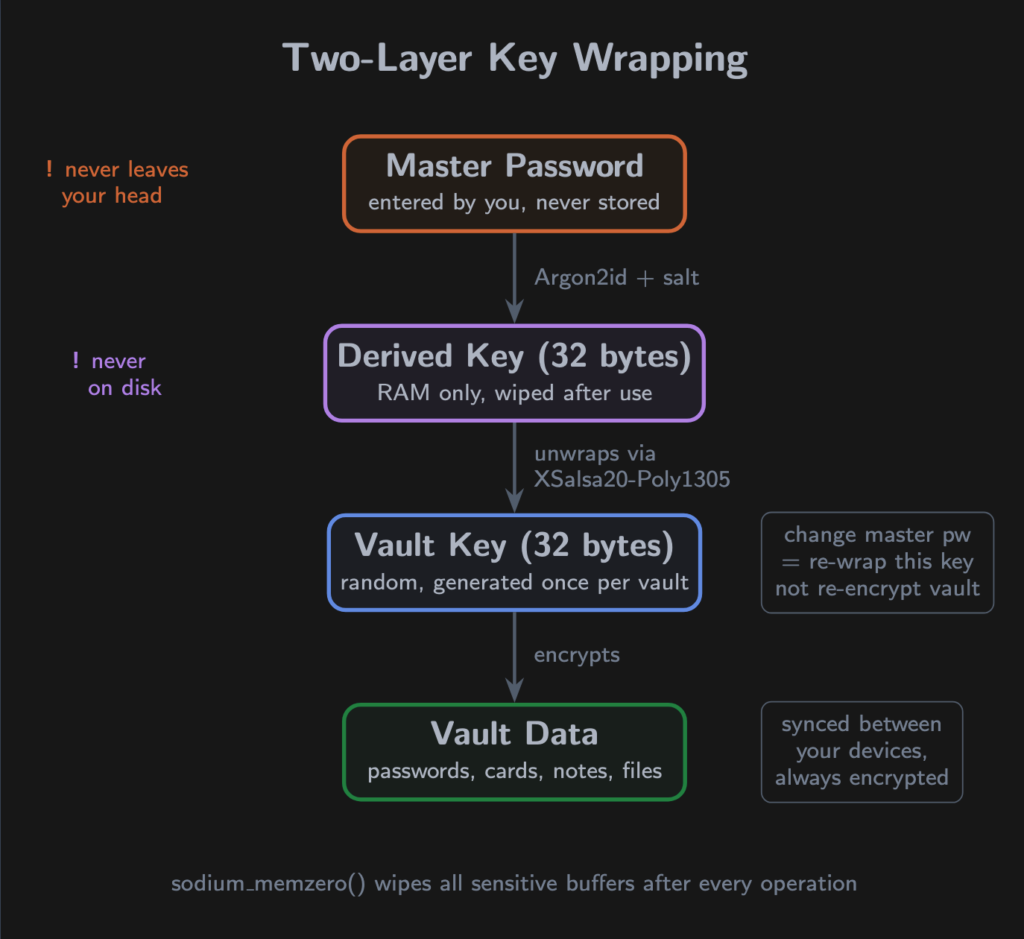
Layer 1 – a random 32-byte vault key is generated when the vault is created. This key encrypts your data inside Autopass.
Layer 2 – the vault key is wrapped with your hashed password using crypto_secretbox (XSalsa20-Poly1305). A fresh 24-byte nonce per operation.
Why two layers? Changing your master password re-encrypts just the vault key – not every password in the vault. And the vault key is high-entropy random, not derived from a human-chosen string.
What stays local, what travels
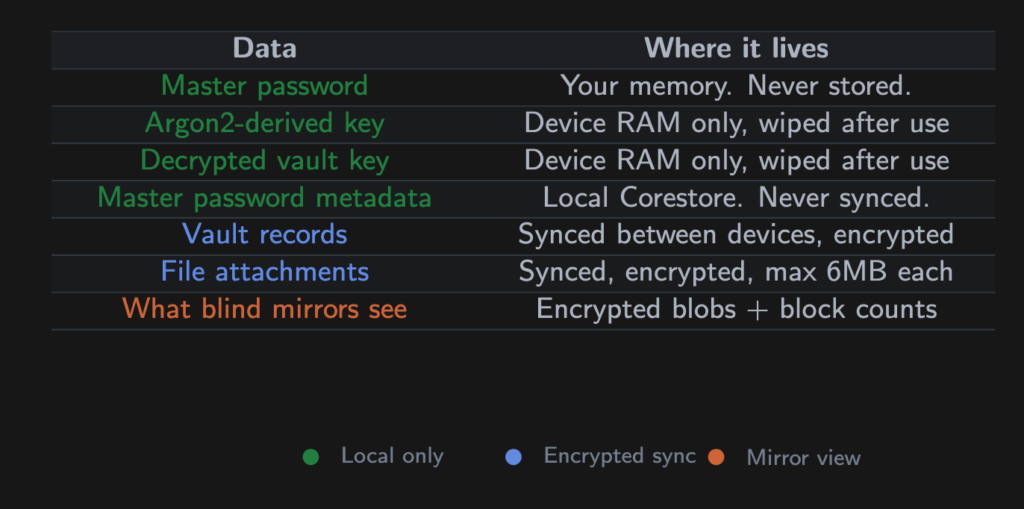
During pairing, the encryption key travels through the blind-pairing secure channel — a Noise-encrypted direct connection. Never through a mirror or third party.
Gotcha – memory safety: Every cryptographic operation runs in an isolated worklet process (Bare sidecar on desktop, react-native-bare-kit on mobile), separate from the UI. Buffers are zeroed in finally blocks — even if an operation throws.
Tradeoffs and challenges
No architecture is free of tradeoffs. Here are ours.
All devices offline
If every peer is asleep, data is unreachable. This is the fundamental P2P availability cost.
Mitigation: blind peers keep encrypted replicas available 24/7. With the default peers enabled (or your own), a device coming online can still pull the latest state even if all your personal devices are off.
Honest cost: if you’ve removed all peers and all devices are off, the vault is unavailable until one returns. For most users, this doesn’t happen.
VPNs and restrictive networks
PearPass uses UDP hole-punching via HyperDHT. Some environments interfere:
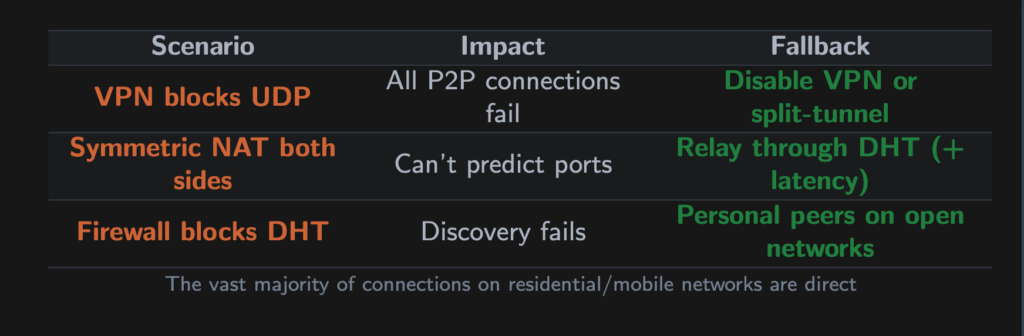
On standard residential and mobile networks, Hyperswarm achieves ~95% direct connections. The first connection takes a few seconds (DHT lookup + hole-punch), but once established, the path performs like any standard connection.
New device sync time
A new device must process the Autobase history to build its view. For large vaults, this takes a noticeable moment.
Mitigation: Autobase’s fast-forward mechanism lets new devices skip to the signedLength checkpoint without replaying every historical operation.
Append-only growth
Logs only grow. Deleting a password adds a deletion record, instead of freeing space.
In practice: password records are a few hundred bytes each. Thousands of entries with frequent changes would accumulate single-digit megabytes over years. Sparse replication means new devices download only what they need.
Mobile platform constraints
iOS and Android aggressively suspend background processes. PearPass uses Corestore’s suspend/resume lifecycle and a write guard that prevents auto-lock from interrupting in-progress syncs.
The autofill extension runs in a separate process with read-only vault access. Credentials captured during autofill go into an encrypted job queue (XSalsa20-Poly1305, fresh nonce). When the main app resumes, it decrypts the queue, processes jobs, and writes to the vault.
Conclusion
The full journey of a password through PearPass:
1. You type your master password. Argon2id hashes it into a 32-byte key. The password is wiped from memory.
2. That key unwraps your vault key via XSalsa20-Poly1305.
3. The vault key unlocks Autopass, backed by Hypercore logs in Corestore — on your filesystem.
4. You save a password. It’s appended to your local Hypercore, integrity guaranteed by BLAKE2b Merkle trees and Ed25519 signatures.
5. Autobase linearizes it with writes from your other devices. The shared view updates.
6. Hyperswarm finds your devices through the DHT, punches through NATs, and replicates over a Noise-encrypted channel.
7. If your devices are offline, blind mirrors hold the encrypted blocks until they return.
At every step, data is either encrypted on your device or encrypted in transit between your devices. No server holds your vault. No company database contains your passwords — encrypted or otherwise.
A company cannot leak passwords it never had.